![DATATON LOGO 2000.png]](https://knowledge.dataton.com/hs-fs/hubfs/DATATON%20LOGO%202000.png?height=42&name=DATATON%20LOGO%202000.png)
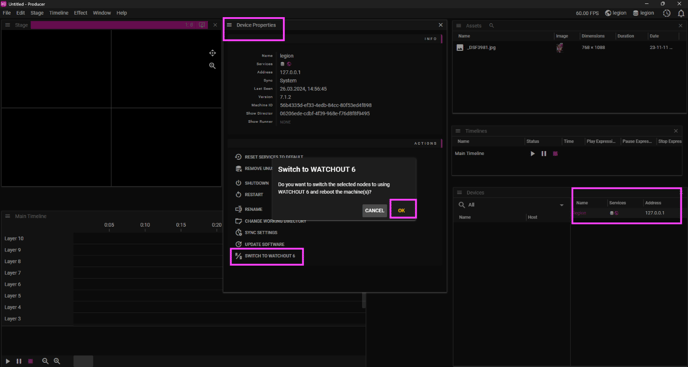
When your server boots with WATCHOUT 7, you can do the switch from WATCHOUT 7.1.2 (or higher version) Producer:
- go into DEVICE window
- from a list choose your WATCHPAX
- go into DEVICE properties
- scroll down
- choose "Switch to WATCHOUT 6"
- confirm with OK in the pop-up window
This will cause WATCHPAX to reboot and then it starts WATCHOUT 6.
If you want to switch from WATCHOUT 6 into WATCHOUT 7 you can do this from WATCHOUT 6.7.3 or higher Production Computer or locally from WATCHPAX media server.
From WATCHOUT 6 production computer:
- Choose one of the displays from WATCHPAX media server
- Go into Stage Menu/Manage Display Computer/Remote Access
- Go into File Menu
- Choose Restart in WATCHOUT 7
Locally from WATCHPAX media server:
- Connect keyboard and mouse to the WATCHPAX unit
- Power the server on
- When you see WATCHOUT 6 splash screen press CTRL+W
- Go into File Menu
- Choose Restart in WATCHOUT 7
This will cause WATCHPAX unit to reboot and then it starts WATCHOUT 7.
Last Updated: 2 October 2024 14:34